


You open Thunderbird. Your inbox is a wall of names. “David Chen” — which David? “Newsletter@somethingcorp.com” — the one you signed up for, or the one that found you? You scroll. You squint. You question your choices.
WhoTheHeckSentThis puts a face — or at minimum a logo — next to every sender in your thread pane. Less time playing email CSI. More time reading your actual mail.

What It Does
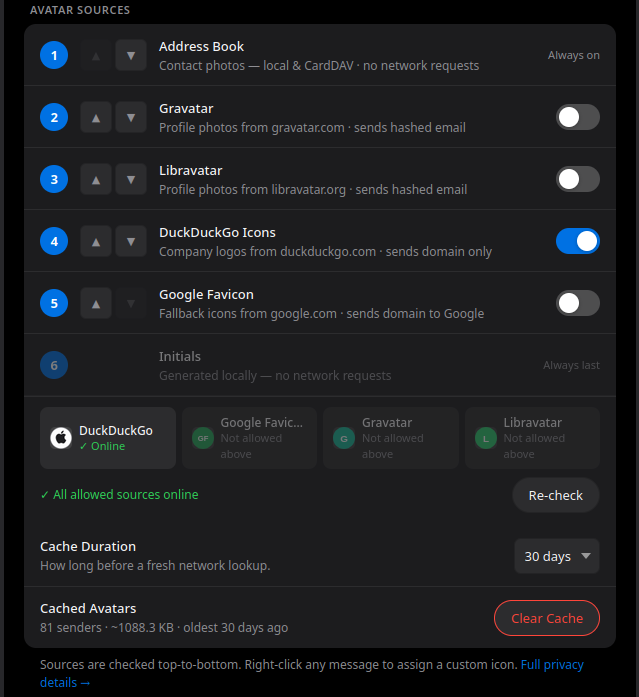
WhoTheHeckSentThis resolves sender avatars automatically, working through a priority list you
control:
- Address Book — if you’ve got a photo saved for a contact, it shows up. Fully local. No network required.
- Gravatar — pulls public profile photos from gravatar.com. Opt-in, off by default.
- DuckDuckGo Icons — company logos and domain icons via DuckDuckGo’s privacy-friendly CDN. Sends only the email domain. Off by default — the first-run setup screen recommends enabling this.
- Google Favicon Service — a secondary fallback for domains DDG doesn’t have. Opt-in, off by default. It’s Google. You know the deal.
- Generated Initials — if nothing else resolves, a clean color-coded initials avatar is generated entirely on your machine. Always last. Always there.
Everything resolves once, then caches locally. For most senders you’ll never hit the network twice.
Features
- Zero setup — install and go. Avatars start appearing in your thread pane immediately.
- Right-click to override — not satisfied with what got pulled automatically? Right-click any message → WhoTheHeckSentThis → Update Avatar Icon. Search the web, or upload an image directly.
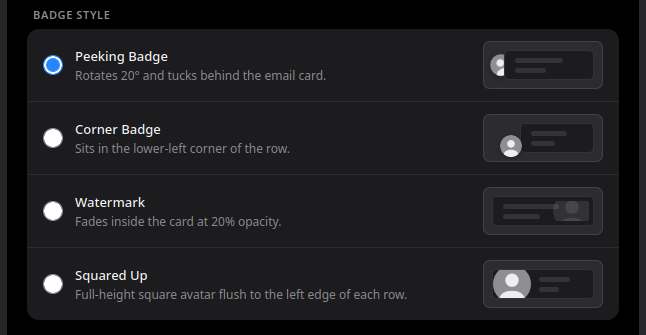
- Three badge styles — Peeking (rotated, tucked behind the message row), Corner, or Watermark. Pick the one that fits how you work.
- Save to Address Book with avatar — one click saves the contact and embeds the resolved photo directly into the vCard.
- Backup & restore — export your custom avatars and settings to a JSON file. Import them back anytime, on any machine.
- All density modes — Compact, Normal, and Touch (Relaxed) all render correctly.
- Dark mode — settings follow your system preference.
Install
[Download on addons.thunderbird.net →][ATN_PLACEHOLDER]
Requires Thunderbird 115.10.0 (Supernova) or later. Free. No account required.
Privacy & Data Use
Here is exactly what WhoTheHeckSentThis does and does not do with your data. No legalese — just the facts.
What never leaves your machine:
- Your email content. The extension only ever sees a sender’s name and email address — never subject lines, message bodies, attachments, or anything else.
- Your address book data, beyond a lookup by the sender’s email address to find a matching photo.
- Generated initials avatars — computed locally from the sender’s name and email, never transmitted anywhere.
- Resolved avatars — once fetched, images are stored in your extension’s local storage on your own machine.
- The ‘full unrestricted access’ warning is standard for any Thunderbird add-on that modifies the
message list UI — it’s the only API available for that.
What may leave your machine
This depends entirely on which sources you have enabled in Settings → Avatar Sources.
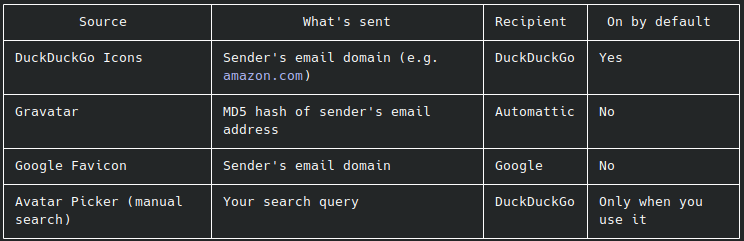
A note on Gravatar: We send an MD5 hash rather than the raw email address. However, MD5 hashes of common email addresses can be reverse-looked up via publicly available rainbow tables. If that concerns you — leave Gravatar off. It’s off by default for exactly this reason.
No analytics. No telemetry. No server.
WhoTheHeckSentThis does not collect usage data, crash reports, or analytics of any kind. There is no server. There is no account. Jack Harvest cannot see anything about how you use this extension — because the extension never talks to Jack Harvest.
Going fully local?
Turn off all three external sources in Settings → Avatar Sources. With that done, the extension
runs entirely on your machine: Address Book photos and generated initials only. No network
requests are made.
Credits & Open Source
- MD5 Implementation by Joseph Myers (http://www.myersdaily.org/joseph/javascript/md5-text.html) — bundled because Gravatar requires MD5 and the WebCrypto API doesn’t support it.
- Gravatar — avatar lookup service by Automattic (https://gravatar.com)
- DuckDuckGo — privacy-friendly icon CDN (https://duckduckgo.com)
- Google Favicon Service — fallback favicon CDN (https://google.com)
Support the Project
WhoTheHeckSentThis is free, and it’s staying that way.
If it’s saved you even five minutes of inbox squinting, buying Jack Harvest a coffee goes a long way:
[Support on Ko-fi →][KOFI_PLACEHOLDER]
For bugs, feature requests, or “this broke on my specific weird setup” — file a report on the ATN listing page or track down Jack Harvest online.
—————————
Thunderbird deserved better. Now it has it.
Can you point me to the install/download for WhoTheHeckSentThis?
Thanks
Kevin
Where is the download link? Is this not available anymore?
The way this post is written makes the discussion feel clear, interesting, and natural while also keeping the topic easy for readers to follow closely.
cum
The formatting and overall presentation of this post are absolutely top-notch. It ensures that the most critical pieces of information stand out clearly without feeling overwhelming.
porno tolsti
I enjoy how this post combines clarity and depth in a way that keeps the discussion interesting, easy to follow, and open enough for readers with different viewpoints to participate comfortably in the conversation.
porno 31 vakti
honestly this is exactly what i needed—tired of having to hover over “Newsletter@somethingcorp.com” trying to figure out if it’s legit or just spam i signed up for ages ago.
One thing I really like here is how naturally the information is presented, since the post manages to stay informative, interesting, and clear at the same time, which is not always easy to achieve in online discussions these days.
在线购买无处方安定片 xxx Porn
There is something very engaging about the way this post communicates its message, because it stays well explained, balanced, and easy to understand while also making the topic feel interesting and interesting for a broad audience of readers online.
https://fyrleyfoodbar.nl/
The overall presentation here feels very clear and approachable because the wording stays clear, the tone remains thoughtful, and the discussion itself encourages positive and meaningful interaction between readers online.
https://kookworkshopbreda.nl/
I appreciate how naturally this post explains the topic without making the discussion feel too heavy, since the overall tone remains easy to connect with, insightful, and comfortable for a wide range of readers to engage with online.
https://win.info.pl/
The discussion here feels both meaningful and easy to follow, since the post keeps a well-paced structure and a calm tone that help maintain reader interest while also encouraging constructive and meaningful interaction online.
在线购买他达拉非片用于肛交XXX色情
This post keeps a great balance between being informative and maintaining an easygoing conversational style throughout.
https://willemschrijft.nl/
The overall structure of this post feels very natural and organized, since the ideas connect naturally and the discussion stays interesting without becoming too complicated for readers to follow carefully.
https://microdosing-xp.nl/
This is exactly the type of direct content I enjoy reading. The neutral presentation and clean formatting ensure that the most important takeaways are immediately obvious to everyone.
kasyno online nowe
I like how this post keeps the discussion thoughtful and interesting while still maintaining a clear and easygoing style, because that combination makes the content easier to understand and more enjoyable for different readers online.
kasyna online wplata blik
It is always a pleasant surprise to find an article that delivers exactly what it promises. Your neutral breakdown of the facts is appreciated and incredibly useful to read today.
在线购买大麻用于XXX成人色情视频
Select DK88 download and enjoy smooth access to mobile casino entertainment in Malaysia.
dk88 casino malaysia
Your writing flows very smoothly, and the transition between the different points you raised was seamless enough that I found myself reading through the entire post without getting distracted or losing my place even once.
https://saprotective.com
I like how this post keeps the discussion clear, engaging, and approachable for readers with different perspectives online.
https://happy-charities.com
I like how this post keeps a friendly and relaxed tone while still presenting the ideas in a simple and well-structured format, because that combination makes the content more pleasant and helps keep readers interested from the first part to the last.
https://ioweqeqwec123.com
The structure of this post works really well because it keeps the ideas well arranged and simple to follow throughout.
zoo porno
I just wanted to take a moment to express my appreciation for the time and effort you clearly invested into putting this material together, as it serves as a fantastic resource for anyone looking to understand the basics.
porno gay
What I appreciate most here is how pleasant the post is to read while still managing to feel relevant, since the discussion stays balanced and worth following without becoming too difficult for readers to follow closely.
https://outdoor.od.ua/pomylka-adaptyvnoho-svitla-bmw-x3-pislia-remontu.html
The structure of Noah’s memoir is episodic rather than strictly chronological, which makes it perfect for dipping in and out of different stories. This format is why many look for a born a crime pdf to read specific essays. One chapter might focus on his dog, Fufi, teaching him a hard lesson about loyalty and betrayal, while another focuses on his entrepreneurial spirit in the township. Each vignette stands on its own but contributes to a larger picture of a young man finding his place in the world. The writing is sharp, accessible, and incredibly engaging. It captures the vibrant, chaotic energy of Soweto and the quiet suburbs, painting a full picture of a divided nation. https://bornacrimepdf.store/ Trevor Noah Born A Crime Free Pdf Download
Spellcasters get a massive boost with the inclusion of spells that were previously only found in specific adventure modules or were entirely new. Spells like “Dragon’s Breath” and “Toll the Dead” have become staples at tables worldwide. Finding the full list and descriptions in a Xanathar’s Guide to Everything PDF is a priority for wizards and clerics everywhere. These spells offer new tactical options and flavor, allowing for more diverse magical strategies in combat. https://xanatharsguidetoeverythingpdf.store/ Xanathar’s Guide To Everything Pdf Reddit
This post has a smooth and well-rounded presentation that keeps the content engaging while still feeling easy for many readers online.
uistin
The fate of the faerie and human worlds rests in Feyre’s hands. She must make impossible choices. The A Court of Wings and Ruin PDF is a convenient option for busy readers. You can read a few pages whenever you have a moment. The story is deeply emotional and action-packed. The characters feel like old friends. The ending is both happy and sad, just like life. It is a beautiful conclusion to a wonderful series. https://acourtofwingsandruinpdf.ru/ A Court Of Wings And Ruin Mobi
Okay the pre-rush prep routine is now part of my daily loop, no exceptions. Between your checklist and the schedule templates on Karinderya Roblox Wiki, my morning shift runs like clockwork.